Encrypt Your OpenTofu State with OpenBao Transit Engine
OpenTofu is an excellent tool for managing infrastructure as code. However, when handling secrets, you don’t want sensitive data ending up in your tfstate file, which might be stored in a bucket or a GitLab repository.
While Ephemeral support is available, not all providers have implemented this feature for secret values. An alternative is to secure your OpenTofu state by encrypting it with a provider like OpenBao’s transit engine.
How Does It Work?
Refer to the official documentation for detailed information. When using OpenBao, OpenTofu generates a key for encrypting and decrypting the state. This key is stored securely and encrypted with OpenBao’s transit engine keys. Ensure your OpenBao instance is accessible during the plan/apply process.
Getting Started
First, create a sample main.tf:
provider "random" {}

resource "random_string" "password" {
   length  = 16
   special = true
   upper   = true
   lower   = true
}

output "generated_password" {
  value = random_string.password.result
}
Assume the generated random string is a secret. Without encryption, this string is stored in plaintext in your Terraform state.
Enabling OpenBao’s Transit Engine for Encryption
If you have a running OpenBao instance, enable the transit engine and create a key:
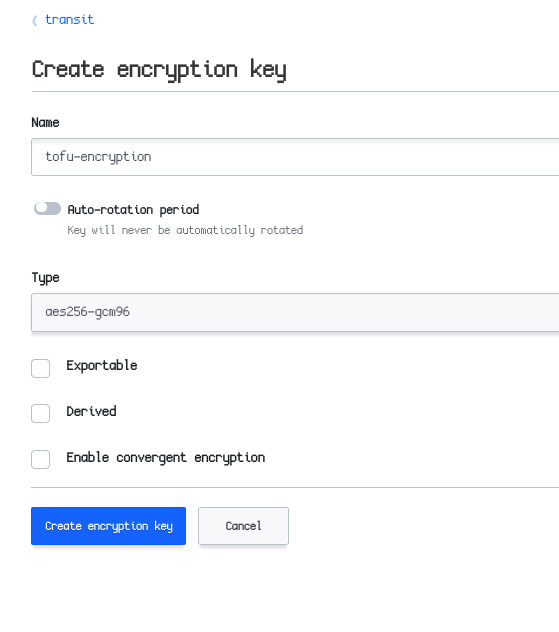
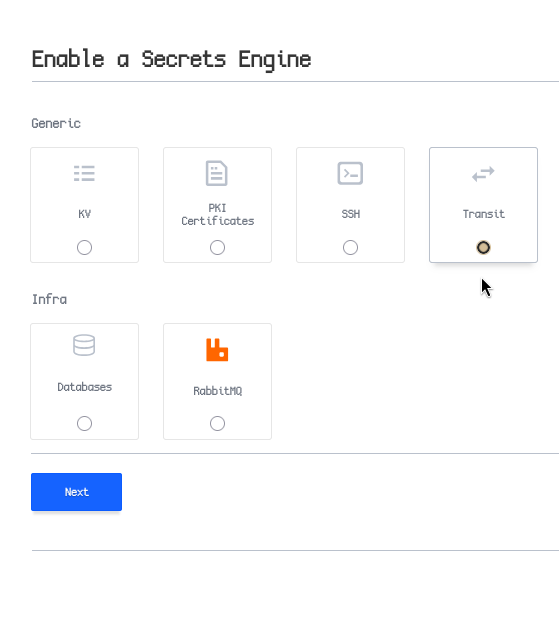
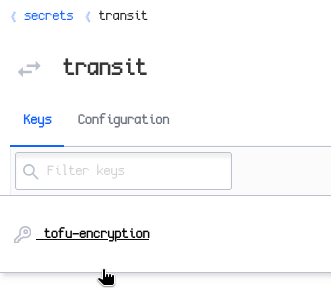
Now, adjust your code to use OpenBao for encryption:
terraform {
  encryption {
    key_provider "openbao" "openbao" {
      address = "http://127.0.0.1:8200" # OpenBao's address
      transit_engine_path = "/transit"  # Transit engine path
      key_name = "tofu-encryption" # Key name
    }
    method "aes_gcm" "aes_gcm" { # Encryption method
      keys = key_provider.openbao.openbao
    }

    state {
      method = method.aes_gcm.aes_gcm # Reference method
    }
  }
}
Ensure you have access to OpenBao by exporting your BAO_TOKEN. This can be integrated into a pipeline by performing JWT authentication with OpenBao and obtaining the token for OpenTofu execution. Ensure the token can access the transit engine and the created key.
export BAO_TOKEN=s.SECRETTOKEN
Run tofu plan to verify:
$ tofu plan
OpenTofu used the selected providers to generate the following execution plan. Resource actions are indicated with the following symbols:
  + create

OpenTofu will perform the following actions:

  # random_string.password will be created
  + resource "random_string" "password" {
      + id          = (known after apply)
      + length      = 16
      + lower       = true
      + min_lower   = 0
      + min_numeric = 0
      + min_special = 0
      + min_upper   = 0
      + number      = true
      + numeric     = true
      + result      = (known after apply)
      + special     = true
      + upper       = true
    }

Plan: 1 to add, 0 to change, 0 to destroy.

Changes to Outputs:
  + generated_password = (known after apply)
Apply the changes:
$ tofu apply
OpenTofu used the selected providers to generate the following execution plan. Resource actions are indicated with the following symbols:
  + create

OpenTofu will perform the following actions:

  # random_string.password will be created
  + resource "random_string" "password" {
      + id          = (known after apply)
      + length      = 16
      + lower       = true
      + min_lower   = 0
      + min_numeric = 0
      + min_special = 0
      + min_upper   = 0
      + number      = true
      + numeric     = true
      + result      = (known after apply)
      + special     = true
      + upper       = true
    }

Plan: 1 to add, 0 to change, 0 to destroy.

Changes to Outputs:
  + generated_password = (known after apply)

Do you want to perform these actions?
  OpenTofu will perform the actions described above.
  Only 'yes' will be accepted to approve.

  Enter a value: yes

random_string.password: Creating...
random_string.password: Creation complete after 0s [id=hy{XMOu4x{aNTit%]

Apply complete! Resources: 1 added, 0 changed, 0 destroyed.

Outputs:

generated_password = "hy{XMOu4x{aNTit%"
Check the Terraform state file. Without specifying a remote store, it’s saved locally:
$ cat terraform.tfstate
{"serial":1,"lineage":"210a8601-69dd-14a4-7e7f-76bb4290bc7b","meta":{"key_provider.openbao.openbao":"eyJjaXBoZXJ0ZXh0IjoiZG1GMWJIUTZkakU2YURsVU5uaFRlbEZ6TTJwVGNXbGpXVGREYWpndmRrUmhVbnBMYkdKRWFrNVFXVWRvVGpWQlRERmlkR3czWlUwMVlVcElja1J6ZW1OSmFFMWhVblJpWjA1dlMzb3ZjMUZDWW1zM1NFUlROekU9In0="},"encrypted_data":"BAAwH4SXQ56wj7pQchZU5P2Fs3nnn2dblGTXxOYxiNsqxJvVzEyt7Hd5K4Zb8D4XLM760aXRJqwyLjAVB47536FBZaYWyNEmcb9XvIKGEbkUE6JVQ3vwDGQJybod6UKycTEfGeWkeN9i6l70MRdcml5Wuxrr2Q2UR8SfsujNbha/m81/hTcbYPeo0uAEBjFvqVL9BdNXjjgS0TrrycGr1XorD/xNkRmOoeTu4YUp3kqASl+CpDJxsYj6ozfve0O1wnR9A5lh3Q01truDCuR2Q330fON/K9rmTv7/VWrP/lYoh54Wlrk6+M5L8eM4yqYEHR4Edz2mdTaoFffJHgkSpNuiVz3mSb2NhpGZRfNqTvf5j9CZMBaj27yGsIDYFY6yx+gDxOOLAP2kvSiVGqfGenU9ZBgWSATjkTuOJr0BUVLCCZZCsGzBCD+AD7TGwGnNsV7ujt2W3ezirn79EIMPRlcXZcoNUU4wrn3+AHHk2At5R4yQuUhdDVik1cibjQtsgjiXfnRY7iufeOTb1t3y6uxD7IQfS/r4Avl6rXFHpS+xrf6TxSydCzWHCHYEwKrUEgCXB/9ztLomWi1iMekgTox41+6ZrhLmkqmnXJgCSycg8X1cNSTUtLXPJ2TXe5BX/Cc9A5e6PKoF5w2m+luQ2Ji39CTt/yE+hLih7eLiWEjoznH28H6XSfFFHY1woB2ZfufClTHsvq02s5d4l4gR4XG2N7Y4xNkGCyJnsvlTu2XEhQB5el/3uRYd7f6Wm4QqwpBeCfDOw6kj8Vk6/u0fVvoaCh9vJTWm1sLpFLYw9qRe7SKNtp/tZhSzleG0qt+EyR+1tSOMa2T4LzcmmojUo2CRXhewwRDYyjgSxImNpnecKGZrqx82vJHkIiC8r6vLLjUPh7Xg6g==","encryption_version":"v0"}%
Perfect! The state file is encrypted, and without access to OpenBao, it cannot be decrypted.